• الرئيسية
  • E-mail
  • Business
  • Files
  • Contacts
  • Advertising
  • المزيد
    • E-mail
    • Business
    • Files
    • Contacts
    • Calendar
    • Games
    • News

    Get Premium
AR عربي
  • ਪੰਜਾਬੀ
  • English
  • বাংলা
  • Indonesian
  • Español
  • Français
  • Deutsch
  • Latviešu
  • Русский
  • Lietuvių
  • Eesti
  1. الرئيسية
  2. E-mail
  3. Настройка интерфейса

%MESSAGE%
Автозавершение адресов э-почты

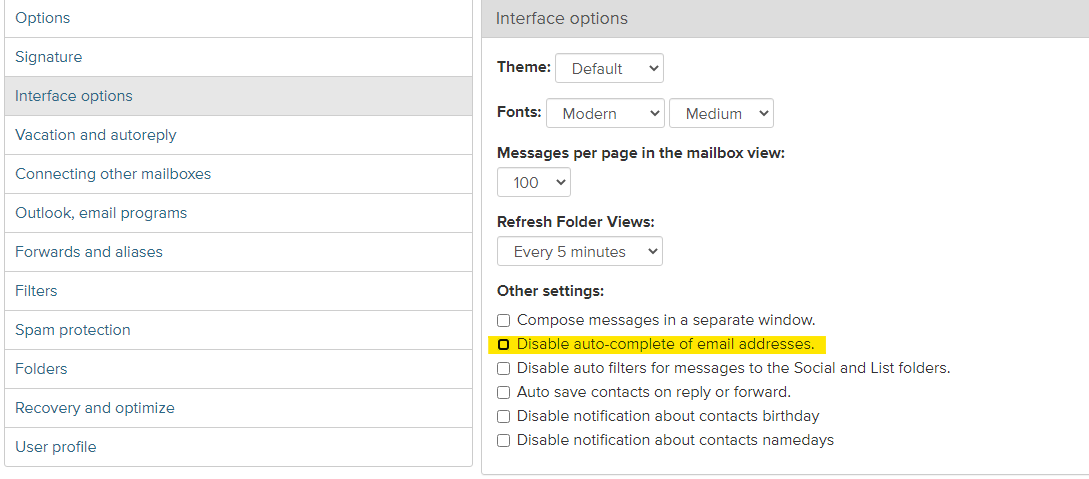
To turn on or turn off auto-complete of e-mail addresses:

  • Go to Options (in the upper right corner) and in the left menu open the Interface options;
  • In the field Disable auto-complete of e-mail addresses insert or remove the tick in the box;
3fdfe43259e22077863f3376b5beee-1683541801-base.png

  • Click Save Options.


في حال لم تجد إجابتك اتصل بنا
أسئلة

Как создать новый профиль в письме
Моё имя/фамилия/ник отображаются неправильно
Темы
Автозавершение адресов э-почты
Обновление содержимого папок
Создание сообщения в новом окне
Количество сообщений на странице
Как изменить шрифт текста и размер букв?
Как отключить уведомления о рождения и именинах контактов?
Оптимизация почтового ящика
التسجيل تسجيل الدخول

  • Inbox.vg
  • E-mail
  • Business
  • Files
  • Contacts
  • Calendar
  • Games
  • News

  • Contacts
  • Support
  • Advertising
  • Privacy
  • Terms of Service

Download our app