• বাড়ি
  • E-mail
  • Business
  • Files
  • Contacts
  • Advertising
  • আরো
    • E-mail
    • Business
    • Files
    • Contacts
    • Calendar
    • Games
    • News

    প্রিমিয়াম নিন
BD বাংলা
  • ਪੰਜਾਬੀ
  • English
  • Indonesian
  • Español
  • Français
  • Deutsch
  • Latviešu
  • Русский
  • Lietuvių
  • Eesti
  • عربي
  1. বাড়ি
  2. E-mail
  3. El Buzón

%MESSAGE%
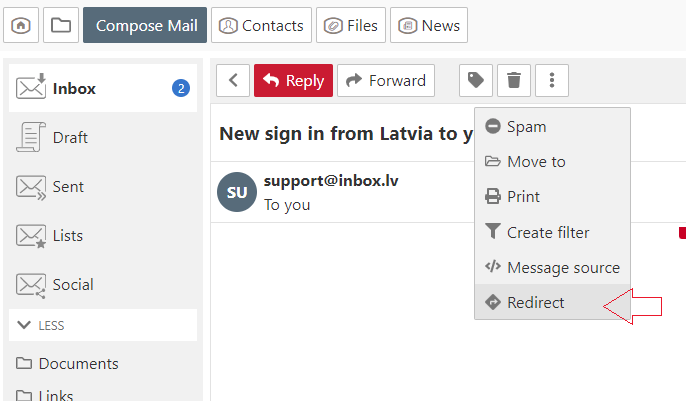
Redirect email

  1. Open the message,
  2. In the menu choose "More" and click "Redirect",
  3. In the new opened window in the  "To" field specify the recipient. If you want to redirect the email to multiple recipients, separate e-mail addresses with a comma,
  4. Click the "Redirect" button.


আপনি যদি আপনার উত্তর খুঁজে না পান তবে আমাদের সাথে যোগাযোগ করুন
প্রশ্ন

How to disable AdBlock program?
The message about web-page blocking
Redirect email
Auto Reply
When I send a message, my personal information isn't correct
View all unread messages in a folder
Threads
Message sorting
Mark letter as
How to change “Inactive” mailbox status?
Letters and pictures size on the computer screen
সাইন আপ লগ ইন করুন

  • Inbox.vg
  • E-mail
  • Business
  • Files
  • Contacts
  • Calendar
  • Games
  • News

  • Contacts
  • Support
  • Advertising
  • Privacy
  • Terms of Service

Download our app